Requesting Notes
To request notes on a script you need to have the following at a minimum:
- At least 1 Peer Credit in your account.
- An uploaded PDF of your script.
- A valid logline and a synopsis.
Once you've met the above requirements, click the Script Action menu (3 dots) to the right of the script and choose "Request Peer Notes". This will display the following screen:
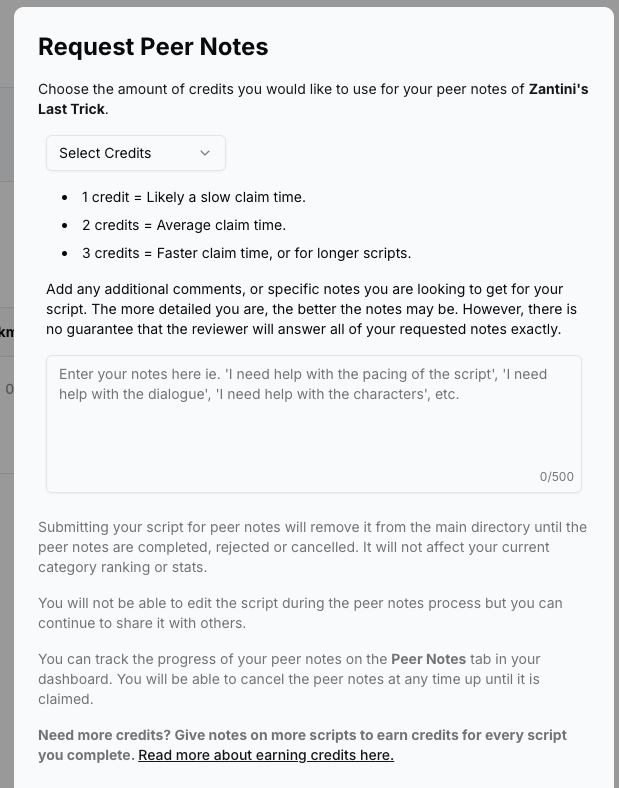
Select Credits
Choose the amount of credits you want to spend. The average spend is 2 credits. A guide is provided on to spend but it advisable to use 1-2 credits for shorts and 3 for features, which obviously take much longer to read. If you want your script to be claimed quicker, don't spend 1 credit for a 150 page feature!
Add Comments
Enter what notes you are looking for in a review. Be specific as possible as this will be presented to the reviewer and will guide them to give feedback on specific areas of your script. Whatever you enter here will also be used to generate dynamic questions at the end of the review. We do this to avoid reviewers using A.I to write the reviews. Note, your comments are used as a guide and there is no guarantee the reviewer will answer all of them.
When the form is complete, click the Request Notes button to submit your request.
The Notes Queue
Once you've submitted a request for Peer Notes, your script will be entered into the queue. You will now see a new tab in your dashboard named Peer Notes.

Click this tab to view the status of your notes request.

The status will displayed "Unclaimed" until someone claims your script and "Claimed" when someone claims your script. You'll also receive an email when someone claims your script.
You also have the ability to cancel the request up until someone claims your script. Once claimed, you will have to wait until the claimee either rejects the claim or completes the review.
Note the following:
- If you previously published your script then while your script is in the process of unclaimed or being reviewed, it will be removed from the main directory and will not be searchable. Once the claim is cancelled (by you or by the claimee) or the review is complete, the script will be returned to the directory and will be searchable again.
- Your script will still be available to share during the review process.
- We remove the title page from your script to provide anonymity.
- Claimees can reject your script upto 48 hours of claiming it. Don't worry, they'll get penalized if this happens and your script will be returned to the queue with a status of "Unclaimed".
The Notes/Review Process
Once your script has been claimed, the claimee has 5 days to complete a review. They can also reject the claim upto 48 hours of claiming. If this happens, your script will automatically be returned to the Peer queue.
Why do we give claimees the option to reject a claim? Since this is a free-to-use system, we understand that sometimes things get in the way, or a claimee may not have the time they thought they had to complete a review. We advise claimees to only cancel a claim if they have no other choice, and by doing so they risk getting a strike (more on that below) which prevents them from either claiming another script or requesting notes on their own.*
Once your notes are complete, you'll get another email informing you that they are ready. To view your completed notes, click the View Notes icon. This will open your notes in a PDF in a separate browser tab.

Leave Feedback For the Reviewer
To leave feedback for the reviewer of your script, click the star icon under Actions.
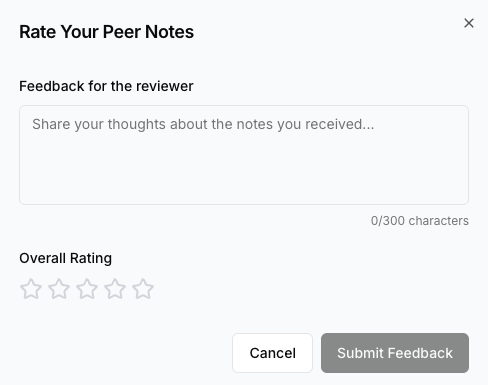
Leave honest feedback for the reviewer and rate their review.
Note: If you're not happy with your notes, please refrain from leaving overly negative feedback. Reviewing scripts takes time and a lot of effort so treat reviewers (your peers) with respect. If you're not happy with the notes, such as they ignored your comments, or you thought it was generated by A.I, or it seems they didn't read your script at all, then please reach out to us at peersupport@scriptiful.com and we'll review the notes given and refund your credits if neccessary.